Tool Review
Pabbly
By Pabbly
Pabbly review and pricing
Fast buying check
If you are comparing Pabbly pricing or reading Pabbly Connect reviews, the useful question is whether its value-focused automation suite can replace enough manual work and separate SaaS subscriptions to justify the switch.
Reviewed by QuestStack Editorial Team on August 30, 2026 · 7 min read. Review current See our scoring method.
Evidence level: public-source editorial assessment. 7 linked primary sources; no authenticated workflow test is claimed unless a test record is explicitly shown on this page.
Affiliate disclosure: we may earn a commission if you purchase through some links. This does not change our scoring methodology.
Decision Summary
Pabbly review and pricing
If you are comparing Pabbly pricing or reading Pabbly Connect reviews, the useful question is whether its value-focused automation suite can replace enough manual work and separate SaaS subscriptions to justify the switch.
Best for
Founders, marketers, SaaS operators, and lean business teams that want no-code workflow automation plus billing, forms, email, WhatsApp, and webhook tools in one value-focused suite.
Not ideal for
Integration coverage and enterprise governance are not as broad as Zapier, and developer flexibility is not as deep as n8n
When to choose it
Choose Pabbly when this buyer profile matches your needs: Founders, marketers, SaaS operators, and lean business teams that want no-code workflow automation plus billing, forms, email, WhatsApp, and webhook tools in one value-focused suite. It is strongest when value for money and feature depth matter most.
Pricing checked on
August 30, 2026 · Pricing current
Official pricing sourceUse the recently verified free entry point before considering a paid plan.
Pricing Snapshot
Pabbly pricing is easiest to justify when the task model, free internal steps, and Pabbly Plus bundle replace several paid tools or reduce automation overage risk.
Why click out now
Use the vendor page to confirm live plan details, trial availability, and whether the buying motion still matches this review.
Compare first
Pabbly vs Shipper.nowStart with one direct comparison before you click out or browse the full alternatives set.
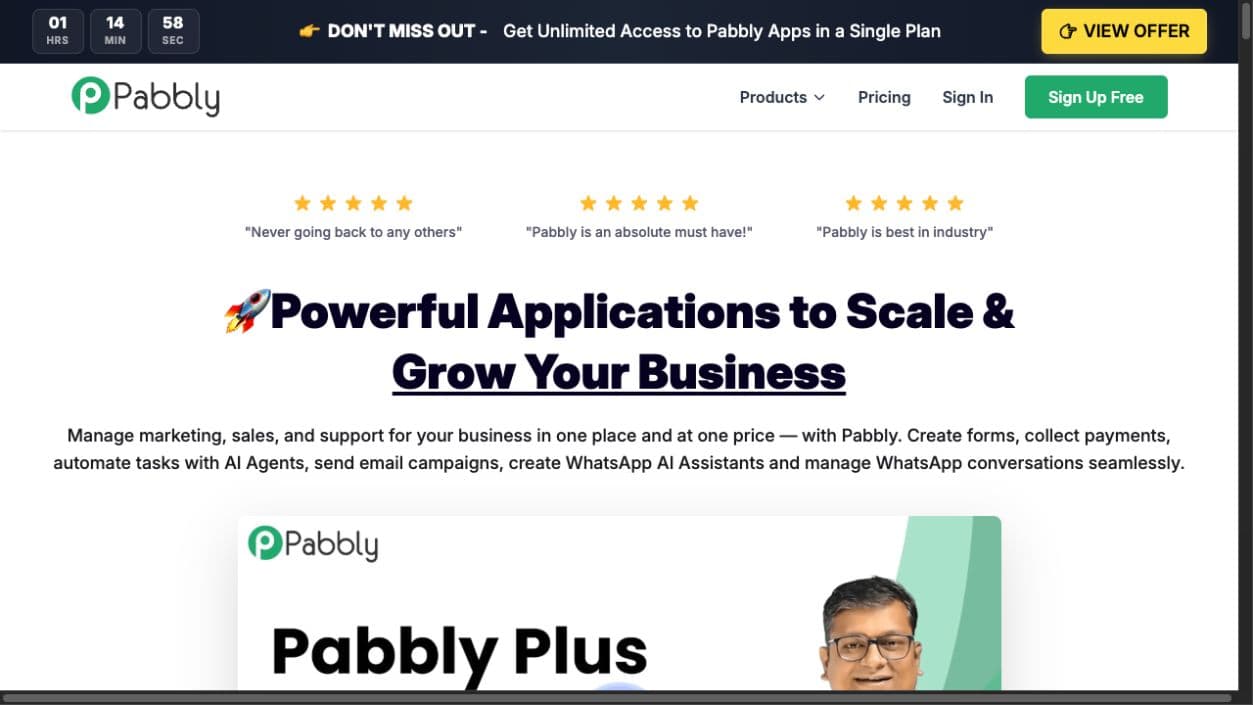
Public product view
What Pabbly currently presents to buyers
Captured from the official public website. This supports the positioning notes in the review but is not an authenticated product-workflow test.
Pricing Snapshot
Use this table to pressure-test whether the commercial model matches the workflow you actually need.
Pricing lens
Pabbly pricing is easiest to justify when the task model, free internal steps, and Pabbly Plus bundle replace several paid tools or reduce automation overage risk.
Trial access
The current Pabbly Connect path includes a free plan, while paid Pabbly Connect and Pabbly Plus offers can appear as yearly, multi-year, or lifetime campaigns.
Best cost signal
Value shows up fastest when the team runs recurring workflows with routers, filters, formatters, webhooks, billing events, forms, and email follow-up.
Watch first
Confirm exact app support, task limits, fair-use terms, support level, and current offer details before assuming the headline bundle covers every workflow.
Official Sources and Pricing Checks
These are the live vendor pages behind the pricing, feature, and workflow notes used in this Pabbly review.
- Official Pabbly pricing and suite overview
Pabbly Plus packaging, current term and locale variations, app coverage, and 30-day refund language verified August 30, 2026.
- Pabbly Connect
Official workflow automation positioning, task model, free plan, internal task notes, and comparison claims.
- Pabbly Connect integrations
Official integration directory for checking app and trigger coverage before buying.
- Pabbly Subscription Billing
Official billing, checkout, gateway, dunning, tax, and affiliate module details.
- Zapier pricing
Official task-based pricing, app coverage, plan tiers, and comparison context.
- Make pricing
Official credit-based pricing, app coverage, scenario limits, and comparison context.
- n8n pricing
Official execution-based pricing, cloud and self-hosted details, and comparison context.
Buyer Questions
What is Pabbly best for?
Pabbly is best for lean teams that want no-code workflow automation plus related business tools such as subscription billing, forms, email marketing, WhatsApp automation, and webhook handling.
How should teams evaluate Pabbly pricing?
Evaluate Pabbly pricing by testing one real workflow, checking which steps count as tasks, and comparing the bundle against the separate subscriptions it could replace.
What should you compare before choosing Pabbly?
Compare Pabbly with Zapier if app coverage and governance matter, Make if visual scenario design matters, n8n if technical control or self-hosting matters, and dedicated billing or affiliate tools if automation is not the main job.
Pros
- Strong value case for high-volume workflow automation because Pabbly emphasizes free internal tasks, unlimited operations, and lifetime or bundle offers
- Pabbly Plus can consolidate automation, subscription billing, email marketing, forms, WhatsApp automation, and webhook handling
- Useful built-in workflow tools include routers, filters, formatters, delays, schedulers, webhooks, email parsing, and multi-step automations
Cons
- Integration coverage and enterprise governance are not as broad as Zapier, and developer flexibility is not as deep as n8n
- Suite breadth can feel uneven if you only need one best-in-class specialist tool
- Lifetime and campaign pricing should be checked carefully because offer terms, currencies, and limits can change
Loadout Features
- No-code workflow builder for triggers, actions, multi-step automations, routers, filters, delays, schedulers, and instant webhooks
- Pabbly Plus bundle covering Connect, Subscription Billing, Chatflow, Email Marketing, Form Builder, Hook, and AgenticAI
- Subscription billing with checkout pages, recurring plans, dunning, tax, coupons, affiliate management, and 35+ payment gateways
Trial, Integrations, and Buying Motion
Buying motion
Pabbly uses a free connect plan with 100 tasks/month; paid connect and plus offers vary by billing term and locale model. Free signup or entry point; no fixed trial duration is published · no card required.
Integrations
Google Sheets, WooCommerce, Stripe, PayPal, Shopify, Webhooks.
Detailed Notes
In this Pabbly (affiliate) review, the important distinction is scope. Pabbly is not only a Zapier-style automation tool. The current product family includes Pabbly Connect for app automation and Pabbly Plus as a broader bundle with billing, forms, email marketing, WhatsApp automation, webhooks, and AI workflow creation.
Bottom line
Pabbly is strongest when the buying job is reducing recurring software cost while keeping everyday business automation practical. Pabbly Connect gives teams a no-code workflow builder, 2,000+ advertised integrations, multi-step workflows, internal tools, instant webhooks, routers, filters, and scheduling. Pabbly Plus adds a suite angle by bundling Connect with subscription billing, email marketing, form building, WhatsApp automation, and webhook handling.
That makes Pabbly most compelling for founders, agencies, marketers, course sellers, SaaS operators, and small teams that want useful automation without a large monthly usage bill. It is less compelling for enterprises that need the deepest app directory, mature admin governance, procurement controls, or developer-first self-hosting.
Where Pabbly fits best
The best fit is a lean business that already knows which repeated work should be automated: lead capture to CRM, form submission to spreadsheet, paid order to email sequence, new checkout customer to onboarding, failed payment to recovery flow, or support intake to team notification.
Pabbly also fits buyers browsing the automation tools category but worrying that task pricing will punish them as workflow volume increases. Pabbly's current positioning leans heavily into value, lifetime access, free internal tasks, unlimited operations, and bundled apps. That is the core reason to evaluate it.
The secondary fit is a digital business that wants payments and automation closer together. Pabbly Subscription Billing includes checkout pages, recurring plans, coupons, dunning, tax support, customer portals, multiple payment gateways, and a built-in affiliate module. It is not the same buying job as a dedicated billing platform or affiliate platform, but the combination can be attractive when the team wants one practical operating suite.
What stands out
The strongest differentiator is task economics. Pabbly Connect says triggers and internal steps such as filters, routers, formatters, schedules, iterators, date/time tools, email parsers, JSON tools, and data transformers do not count as paid tasks. Only external action steps consume tasks. That matters if your workflows use a lot of cleanup, routing, parsing, and delay logic before sending data to another app.
The second differentiator is the Pabbly Plus bundle. Instead of buying separate subscriptions for automation, form capture, email marketing, subscription billing, WhatsApp automation, and webhook tools, the current suite pitch is one plan for the Pabbly apps. The bundle will not replace every specialist product in every category, but it can be a strong value move when the team needs "good enough and connected" more than "best in class everywhere."
The third differentiator is business-process coverage. Pabbly is not only for syncing two apps. The live pages emphasize ecommerce automation, payment gateway automation, CRM and sales automation, lead capture, marketing automation, social media workflows, WhatsApp automation, subscription billing, checkout pages, dunning, tax, affiliate management, and webhook handling. That makes it feel like a small-business operations suite with automation at the center.
Pabbly pricing and ROI
Pabbly pricing needs to be checked live before purchase because the public pages can show different buying paths by product, billing term, campaign, and locale. The August 2026 check confirmed a no-card Pabbly Connect free plan with 100 tasks each month, alongside paid Connect and Pabbly Plus offers that can use yearly, multi-year, or one-time packaging. The safest evaluation is not just "what is the cheapest plan today?" It is "which workflow volume and which apps are included in the plan I am about to buy?"
The ROI case is clearest when Pabbly replaces multiple subscriptions or removes enough task overage anxiety to make automation feel usable. If a team is paying separately for a workflow tool, form builder, email tool, billing system, webhook helper, and small internal automation utilities, Pabbly Plus can become compelling quickly.
The Pabbly Connect free plan is useful for proof of fit. Use it to build one real workflow with the exact trigger, internal steps, and external actions you expect to run. Then check how the workflow consumes tasks, whether the target apps behave reliably, and whether the plan limits match the volume you actually need.
Trade-offs to know
The main trade-off is depth versus value. Pabbly is a practical suite, not the most mature enterprise automation platform in every dimension. Zapier has a larger app ecosystem and stronger mainstream adoption. Make has a very polished visual builder and flexible scenario design. n8n is more attractive for technical teams that want self-hosting, code steps, version control, and deeper developer control.
The second trade-off is suite sprawl. Bundles are powerful when you use several pieces. They are less persuasive if your team only needs one specialized product. If you only need affiliate software, compare dedicated tools like Rewardful and Refgrow. If you only need scheduling, compare Cal.com. If you only need screenshot infrastructure, compare ScreenshotOne. Pabbly wins when the connected suite is the point.
The third trade-off is offer clarity. Lifetime deals and limited-time bundles can be excellent, but buyers should read the current task limits, fair-use policy, app access, support level, team access, and refund terms before assuming the headline offer covers every future use case.
Relevant comparisons
Pabbly vs Zapier is the natural first comparison. Choose Pabbly when cost control, free internal tasks, and bundle value matter more than the largest possible app directory. Choose Zapier when your team needs the broadest integration coverage, more mature enterprise controls, and a familiar automation standard that many teams already know.
Pabbly vs Make is about workflow style and price sensitivity. Choose Pabbly when the goal is affordable, straightforward business automation with bundled tools. Choose Make when the visual scenario builder, operation-level control, and advanced workflow design experience matter more than lifetime or suite economics.
Pabbly vs n8n depends on technical appetite. Choose Pabbly for no-code business users who want hosted automation and bundled business apps. Choose n8n when the team has technical operators who want self-hosting options, code-friendly workflow logic, execution-based pricing, version control, and deeper customization.
Pabbly vs dedicated billing tools is a fit question. Pabbly Subscription Billing looks useful for one-time and recurring payments, checkout pages, coupons, failed-payment recovery, tax, multiple payment gateways, and affiliate management. Dedicated billing platforms may still win when you need deeper revenue recognition, enterprise finance controls, complex SaaS entitlements, or accounting workflows.
Pabbly vs dedicated affiliate software is similar. Pabbly's built-in affiliate module is attractive if you want affiliate tracking inside a broader billing suite. Rewardful, Refgrow, and Affonso are better comparisons when the affiliate program itself is the main product decision.
Evaluation checklist
Before buying Pabbly, build a small but realistic workflow. A good test is one trigger, two or three internal steps, one branch, one delay or schedule, and two external actions. That exposes the real setup experience better than a simple "new row to email" demo.
Check these items before committing:
- Does Pabbly support the exact apps and trigger events you need?
- Which workflow steps count as paid tasks on your plan?
- Do routers, filters, formatters, webhooks, and parsers behave the way your process requires?
- Can the team monitor failed runs and fix them without engineering help?
- Does the bundle replace tools you already pay for, or does it add another dashboard?
- Are the current lifetime, yearly, or bundle terms clear enough for your expected volume?
Buyer scenarios
Pabbly is a strong fit for a founder running lead capture, onboarding, customer updates, billing notifications, and basic CRM movement across several tools. It is also a strong fit for an agency that wants to build client automations without worrying that every internal formatting step will make task usage feel expensive.
It can work well for course sellers, creators, and small digital businesses that want checkout pages, subscription billing, forms, email follow-up, and automation in one connected stack. The fewer people on the team, the more the suite argument matters because tool switching itself becomes expensive.
Pabbly is a weaker fit when the buyer needs strict enterprise governance, a huge long-tail app directory, complex approval workflows, self-hosted automation, or deep engineering extensibility. Those teams should compare Zapier, Make, n8n, and category-specific systems before assuming Pabbly's value story is enough.
Metrics to watch after signup
Do not judge Pabbly only by the number of workflows created. Track manual steps removed, workflow runs completed, failed runs, task usage, time saved per workflow, subscription or checkout recovery events, and the number of separate tools the bundle actually replaces.
For Pabbly Connect, watch whether internal logic helps you keep workflows cleaner without burning task volume. For Pabbly Subscription Billing, watch payment conversion, failed payment recovery, refund rate, affiliate-driven revenue, and support tickets related to billing confusion.
Final buying rule
Choose Pabbly when automation volume, suite consolidation, and value for money are the deciding factors. It is most appealing when you can point to several recurring workflows and at least two or three Pabbly apps that would replace paid tools or reduce manual operations.
Do not choose Pabbly only because the headline offer looks inexpensive. Choose it after confirming that the exact integrations, task model, bundle terms, and support path fit the workflows you will actually run.
For most lean teams, that is the right test: build one real workflow, confirm the live offer, and decide whether Pabbly removes more operational drag than it adds.
Alternatives worth considering
If you want a wider shortlist before choosing, compare Pabbly with the rest of the automation tools, the payments tools, and the best workflow automation software page. If the real job is billing or affiliate management rather than workflow automation, start with Rewardful, Refgrow, and Affonso before treating Pabbly as the default.
How We Reviewed Pabbly
This public-source assessment uses the same criteria for every tool: ease of use, feature depth, value for money, support, and integration flexibility. The evidence and scoring notes are tied to our published review policy, and affiliate relationships do not change the scoring model.
Alternatives
Reviewed alternatives to Pabbly
These are the closest alternatives in QuestStack's reviewed inventory. Use the direct comparisons where available, then verify current pricing and workflow fit in each full review.
Cal.com
Operators, client-facing teams, and organizations that need booking links plus stronger routing, workflows, payments, and calendar integration depth than basic schedulers provide.
Shipper.now
Founders and operators who need to build and launch web apps quickly without writing code.
ScreenshotOne
Developers, product teams, and automation-heavy businesses that need reliable website screenshots, PDF rendering, visual monitoring, or screenshot generation inside code and no-code workflows.
Major options not yet scored by QuestStack
These direct, non-affiliate official-site links broaden the market view without placing unreviewed products in the numbered score model.
Zapier
Large no-code automation platform; not yet scored by QuestStack.
Official websiteMake
Visual workflow automation platform; not yet scored by QuestStack.
Official websiten8n
Workflow automation with cloud and self-hosted paths; not yet scored by QuestStack.
Official websiteHubSpot
CRM and revenue platform; not yet scored by QuestStack.
Official websiteSalesforce
Enterprise CRM platform; not yet scored by QuestStack.
Official websitePipedrive
Sales pipeline CRM; not yet scored by QuestStack.
Official websiteCompare Pabbly directly
Pabbly vs Genviral
Compare pricing fit, workflow depth, and the clearest reason to choose Pabbly or Genviral.
Pabbly vs ScreenshotOne
Compare pricing fit, workflow depth, and the clearest reason to choose Pabbly or ScreenshotOne.
Pabbly vs Shipper.now
Compare pricing fit, workflow depth, and the clearest reason to choose Pabbly or Shipper.now.